|
|
Joined: Mar 2011
Posts: 3,918 Likes: 8
Senior Member
|
|
Senior Member
Joined: Mar 2011
Posts: 3,918 Likes: 8 |
Hey guys, updated the 1st post with some more information. Will add more as I get the time!
The older I get, the more I realize I don't need to be Han, Luke or Leia. I'm just happy to be rebel scum...
|
|
|
|
|
Joined: Dec 2013
Posts: 424
Member
|
|
Member
Joined: Dec 2013
Posts: 424 |
Thanks for excellent tips. The charcoal Nieup is very beautiful
i5 2320, 3.3 GHz
GTX 560Ti, 4 GB graphics memory
8 GB RAM
Windows 7 64x
|
|
|
|
|
Joined: Mar 2009
Posts: 7,532
Hotshot
|
|
Hotshot
Joined: Mar 2009
Posts: 7,532 |
Alrighty...just downloaded Gimp and now am getting ready to watch the video.
Hopefully I'll be painting shortly. Always like a personal skin when I get 5 victories.
Kind of an award to myself especially since I don't often live that long.
EDIT: Very nice job on the video Rick. Even a graphics nit-wit like me should be able to do some passable work now.
Layers! Gotta remember to use layers!
|
|
|
|
|
Joined: Mar 2011
Posts: 3,918 Likes: 8
Senior Member
|
|
Senior Member
Joined: Mar 2011
Posts: 3,918 Likes: 8 |
Yes, forgetting to put everything in a new layer has caused me multiple headaches... also, don't forget that you can drag layers around in the layer dock to get the one you want on top, so if you can't see something, make sure that layer is above the others. Oh, and ask questions! We have some great artists on here and if you can think of something you want to try, they can point you in the right direction!
The older I get, the more I realize I don't need to be Han, Luke or Leia. I'm just happy to be rebel scum...
|
|
|
|
|
Joined: Mar 2011
Posts: 3,918 Likes: 8
Senior Member
|
|
Senior Member
Joined: Mar 2011
Posts: 3,918 Likes: 8 |
New tip added on the first post...
The older I get, the more I realize I don't need to be Han, Luke or Leia. I'm just happy to be rebel scum...
|
|
|
|
|
Joined: Aug 2010
Posts: 6,659
Hotshot
|
|
Hotshot
Joined: Aug 2010
Posts: 6,659 |
 Awsome, Gimp has a Ruler ? Now maybe I can paint a strait Line. 
|
|
|
|
|
Joined: Mar 2011
Posts: 3,918 Likes: 8
Senior Member
|
|
Senior Member
Joined: Mar 2011
Posts: 3,918 Likes: 8 |
Ha! carrick, I covered the hold-shift left click line drawing technique in the video! 
The older I get, the more I realize I don't need to be Han, Luke or Leia. I'm just happy to be rebel scum...
|
|
|
|
|
Joined: Mar 2009
Posts: 7,532
Hotshot
|
|
Hotshot
Joined: Mar 2009
Posts: 7,532 |
The layer thing is working just fine though I find paint.net a little easier to use perhaps as I did a few skin mods in the OFF days.
One thing I am finding is with the opacity of colors on a layer. In the paint.net preview screen I give the color opacity so the original aircraft detail is still visible underneath. However in the sim the color looks quite solid with no detail visible.
Now this could be due to a million factors, lack of experience being A#1, but do you find in preview Gimp is more aucurate as to how the skin will look in-game? If you have any experience with both programs that is.
|
|
|
|
|
Joined: Mar 2011
Posts: 3,918 Likes: 8
Senior Member
|
|
Senior Member
Joined: Mar 2011
Posts: 3,918 Likes: 8 |
Hey Duke, I've never used paint.net, I think Louvert does though, and he gets masterful results, as you can see on the first page. Maybe he'll see this and chime in. Perhaps there is a "commit" option you need to click to get the preview to show up on the final screen? From what I've seen, GIMP is pretty much a WYSIWYG kind of deal:   It pretty much shows up as it will in-game. Maybe post some screens of what you are geeting in paint, vs. how it looks in game and we can help more? -Rick
The older I get, the more I realize I don't need to be Han, Luke or Leia. I'm just happy to be rebel scum...
|
|
|
|
|
Joined: Mar 2009
Posts: 7,532
Hotshot
|
|
Hotshot
Joined: Mar 2009
Posts: 7,532 |
Thanks.
I will have to "over opaque" in paint.net I think or give Gimp another throw round.
More experience may also be beneficial!
|
|
|
|
|
Joined: Jul 2009
Posts: 1,267
Member
|
|
Member
Joined: Jul 2009
Posts: 1,267 |
Just a question for aircraft that have numbers on the side of the fuselage.
If I look at the Camel_sqd_t the fuselages point left and right and the number is easily visible - B6224
If I look at the Default_t_1916_Bri of the Sopwith 1� strutter both fuselage sides point left and one of the sets of numbers is a mirror image of 9488.
So, firstly, why is this? Secondly how do we do mirror image letters and numbers in GIMP?
LG 27" 27mp65 monitor; EVGA GTX970 GPU; AMD Ryzen 3500 CPU; Corsair 750w PSU; MSI X470 mobo
RAF 1966-73 Cpl Engine Fitter (Retd.) Trenchard brat 206th Entry
DBA and systems programmer 1981-2005. Now retired since 2014
|
|
|
|
|
Joined: Jun 2012
Posts: 7,997
BWOC Survivor!...So Far!! Hotshot
|
|
BWOC Survivor!...So Far!! Hotshot
Joined: Jun 2012
Posts: 7,997 |
Just a question for aircraft that have numbers on the side of the fuselage.
If I look at the Camel_sqd_t the fuselages point left and right and the number is easily visible - B6224
If I look at the Default_t_1916_Bri of the Sopwith 1� strutter both fuselage sides point left and one of the sets of numbers is a mirror image of 9488.
So, firstly, why is this? Secondly how do we do mirror image letters and numbers in GIMP? Jim You can cut out the fuselage and flip it horizontal so it is not mirror, do the lettering, and flip it back. This is a very brief description but I think it will give you a lead. You can also create a mask layer and then generate the letters and then flip it horizontal to get mirror image and then place it appropriately
Case: Cooler Master Storm Trooper
PSU: Ultra X3,1000-Watt
MB: Asus Maximus VI Extreme
Mem: Corsair Vengeance (2x 8GB), PC3-12800, DDR3-1600MHz, Unbuffered
CPU: Intel i7-4770K, OC to 4.427Ghz
CPU Cooler: Cooler Master Seidon 240M Liquid CPU Cooler
Vid Card: ASUS GTX 980Ti STRIX 6GB
OS and Games on separate: Samsung 840 Series 250GB SSD
Monitor: Primary ASUS PG27AQ 4k; Secondary Samsung SyncMaster BX2450L
Periphs: MS Sidewinder FFB2 Pro, TrackIR 4
|
|
|
|
|
Joined: Jul 2009
Posts: 1,267
Member
|
|
Member
Joined: Jul 2009
Posts: 1,267 |
Thanks I'll give it a try. I want to create the most famous Camel of all - B6313
LG 27" 27mp65 monitor; EVGA GTX970 GPU; AMD Ryzen 3500 CPU; Corsair 750w PSU; MSI X470 mobo
RAF 1966-73 Cpl Engine Fitter (Retd.) Trenchard brat 206th Entry
DBA and systems programmer 1981-2005. Now retired since 2014
|
|
|
|
|
Joined: Jun 2012
Posts: 7,997
BWOC Survivor!...So Far!! Hotshot
|
|
BWOC Survivor!...So Far!! Hotshot
Joined: Jun 2012
Posts: 7,997 |
Thanks I'll give it a try. I want to create the most famous Camel of all - B6313 That camel was already created by me in OFF and now it exists in WOFF. In all it's variants I believe it is still available as a download from CA
Last edited by Robert_Wiggins; 10/18/14 04:32 PM.
Case: Cooler Master Storm Trooper
PSU: Ultra X3,1000-Watt
MB: Asus Maximus VI Extreme
Mem: Corsair Vengeance (2x 8GB), PC3-12800, DDR3-1600MHz, Unbuffered
CPU: Intel i7-4770K, OC to 4.427Ghz
CPU Cooler: Cooler Master Seidon 240M Liquid CPU Cooler
Vid Card: ASUS GTX 980Ti STRIX 6GB
OS and Games on separate: Samsung 840 Series 250GB SSD
Monitor: Primary ASUS PG27AQ 4k; Secondary Samsung SyncMaster BX2450L
Periphs: MS Sidewinder FFB2 Pro, TrackIR 4
|
|
|
|
|
Joined: May 2012
Posts: 1,287 Likes: 108
Member
|
|
Member
Joined: May 2012
Posts: 1,287 Likes: 108 |
Just a question for aircraft that have numbers on the side of the fuselage.
If I look at the Camel_sqd_t the fuselages point left and right and the number is easily visible - B6224
If I look at the Default_t_1916_Bri of the Sopwith 1� strutter both fuselage sides point left and one of the sets of numbers is a mirror image of 9488.
So, firstly, why is this? Secondly how do we do mirror image letters and numbers in GIMP? Sorry I'm jumping in late on this thread... Always remember, you make the skin to fit the model. However the model is set to map to the skin position is how you have to setup the detail and additional artwork of the skin template. So there are many trips to the drome to take to test everything out that you add in. OvS
The Black Baron of Boistrancourt returns!!
I'd rather die fighting, than live for nothing. - Gen. G.S. Patton
|
|
|
|
|
Joined: Aug 2012
Posts: 730
Member
|
|
Member
Joined: Aug 2012
Posts: 730 |
Thanks for this tutorial Rick.
I've taken my first tentative steps with a custom skin as a result.
|
|
|
|
|
Joined: Mar 2011
Posts: 3,918 Likes: 8
Senior Member
|
|
Senior Member
Joined: Mar 2011
Posts: 3,918 Likes: 8 |
Good for you, man! It can be addictive! Make sure you start a new thread to introduce your pilot and your skin, we love PICS! 
The older I get, the more I realize I don't need to be Han, Luke or Leia. I'm just happy to be rebel scum...
|
|
|
|
|
Joined: Aug 2012
Posts: 730
Member
|
|
Member
Joined: Aug 2012
Posts: 730 |
My first attempt is really basic. Not worth a new thread. I have simply extended 54 squadron's themes (Number and Initials) to my pilot, painted the rear part of the cowling and added a ring to the wheels for ease of identification. There are scratches that I have painted in to the panels that really don't show. It's a really simple skin, but it is my first, so that's what you would expect. I hope anyway.  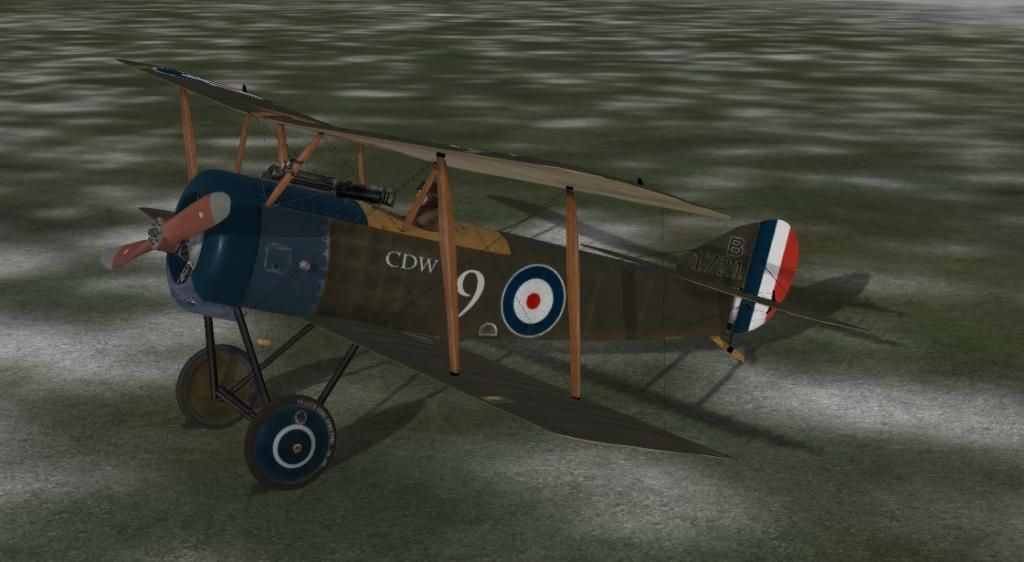
|
|
|
|
|
Joined: Mar 2011
Posts: 3,918 Likes: 8
Senior Member
|
|
Senior Member
Joined: Mar 2011
Posts: 3,918 Likes: 8 |
That looks very convincing, it really ties the room together! Much better than my first effort... keep up the great work, Maeran.
The older I get, the more I realize I don't need to be Han, Luke or Leia. I'm just happy to be rebel scum...
|
|
|
|
|
Joined: Jun 2014
Posts: 2,420
Member
|
|
Member
Joined: Jun 2014
Posts: 2,420 |
Help! I'm trying to complete my first skin and I've watched the skinning tutorial and when he gets to the part where he is saving his skin in GIMP to the extended bmp, he selects it from a drop-down menu that has a number of extension options. My problem is when I try to do that in GIMP I only have about 4 options and I definitely don't have the Windows bmp option. What do I do?
Member and provider of banjo music for the Illustrious BOC
|
|
|
|
|
J-B Weld
by Terl9999 - 10/02/26 11:54 PM
|
|
|
|
|
|
|
|
|
|
|
|
|
|
|
|
|
|
|
|