SimHQ
Previous Thread
Next Thread
Print Thread
Rating: 5
Hop To
Page 15 of 112 1 2 … 13 14 15 16 17 … 111 112
Joined: Jan 2014
Posts: 274
M
Member
Member
M Offline
Joined: Jan 2014
Posts: 274

Inline advert (2nd and 3rd post)

Joined: Jan 2011
Posts: 658
B
BS 62 "Pegasus" CAG
Member
BS 62 "Pegasus" CAG
Member
B Offline
Joined: Jan 2011
Posts: 658
that means that TM kept the same color code, Thanks this is really apreciated

Last edited by Bluedeath; 03/27/15 12:41 PM.

"When you plan revenge best dig two graves" Confucius
"They who can give up essential liberty to obtain a little temporary safety, deserve neither liberty nor safety" Benjamin Franklin
Joined: Mar 2015
Posts: 51
S
Junior Member
Junior Member
S Offline
Joined: Mar 2015
Posts: 51
yes sir it works ok !!!

Everything devia to poor welding, now I'm preparing the array of buttons.

thank you very much

Last edited by Sak75; 03/27/15 02:44 PM.
Joined: Jan 2014
Posts: 274
M
Member
Member
M Offline
Joined: Jan 2014
Posts: 274
Added save calibration manually
The old auto calibration mode (run every time you turn the computer)is called "automatic with center"/"automatic without center"
The new save calibration manually is called "save with center"/"save without center"

Manual calibration is performed as follows:

1) select in the Configurator the desired calibration mode, save and reboot the device (MMjoy).
2) in the Configurator click "Reset Calibration"
3) if somewhere is set to "save with center" then put the handle / pedal in neutral
4) click "Start Calibration"
5) Wait one second or two to controller (MMjoy) find the neutral position, after move the joystick/pedal for maximum position (the controller will catches the extreme positions)
6) Then click "Save Calibration"
7) Reboot the device (MMjoy).

Added "AxisToButton"
The axis button looks like is for press a button with axis movement, for example at end of throttle axis course the button set for Afterburner or WEP is pressed.

In the 1st field select the button that will be pressed (1 - 96)
In the 2nd field select the axis that will make the press (1 - 8)

In the 3rd and 4rd fields define the minimum and maximum values that axis should reach for the press happen, for example 2900 - 3000, if the axis is in this interval the button will be pressed if is moved for bellow the minimum vale (or above the maximum) the button is released.

Thanks Sokol1 to translate from russian!!!

Last edited by mega_mozg_13; 03/28/15 04:54 AM.
Joined: Jan 2010
Posts: 464
T
Member
Member
T Offline
Joined: Jan 2010
Posts: 464
Hi mega_mozg,

Thanks.
Where is the new version that have "save with center"?
The latest version that I can find in download page is still v20150121.

Joined: Jan 2010
Posts: 464
T
Member
Member
T Offline
Joined: Jan 2010
Posts: 464
is it the latest one in the beta section?
v20150325 ?

Joined: Jan 2010
Posts: 464
T
Member
Member
T Offline
Joined: Jan 2010
Posts: 464
after upload the latest firmware (v20150325 update 2),
all my joystick buttons do not work.

it seems that mega_mozg changes the button matrix configuration,
or it still has some serious bug.

all the axis work, though.
and "save with center" also works.

now I go back to v20150121 firmware,
all the buttons work again with this version.

Joined: Jan 2014
Posts: 274
M
Member
Member
M Offline
Joined: Jan 2014
Posts: 274
to all.
from old to v201503xx version just switch row and columns at configurator(we are found a bug in old firmware buttons reading).

Joined: Jan 2004
Posts: 1,222
Likes: 2
More projects than sense!
Member
More projects than sense!
Member
Joined: Jan 2004
Posts: 1,222
Likes: 2
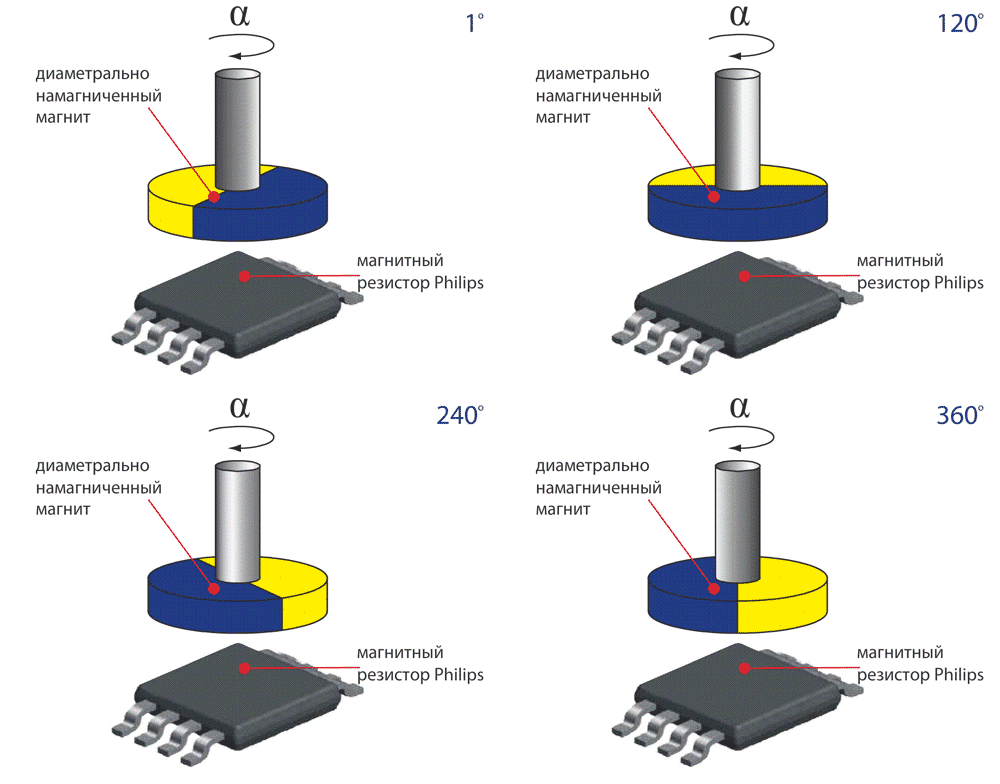
I take it you just rotate a neodymium magnet in front of this sensor to interact with it?

g.


Proud owner of 80-0007
http://www.f15sim.com - The only one of its kind.
http://geneb.simpits.org - the Me-109F/X Project
Joined: Jan 2014
Posts: 274
M
Member
Member
M Offline
Joined: Jan 2014
Posts: 274
Originally Posted By: f15sim
I take it you just rotate a neodymium magnet in front of this sensor to interact with it?


like this

Joined: Jan 2010
Posts: 464
T
Member
Member
T Offline
Joined: Jan 2010
Posts: 464
Hi mega_mozg,

Is this digital angle sensor TLE5010/TLE5011 better than HALL sensor?
more accurate?

Please let us know the difference.

Joined: Nov 2001
Posts: 3,960
S
Senior Member
Senior Member
S Offline
Joined: Nov 2001
Posts: 3,960
Originally Posted By: Bluedeath
IS there any suggested card to do the conversion of a ch fighterstick keeping the original matrix of the stick handle?


Since I have a gameport CH Fighterstick laying around for years, your question make me reminder them, so I decide investigate his matrix.

The plug coming from grip to original PCB has 11 wires - but only 9 are used, what means a 4 x 5 matrix = 20 buttons.
the dark blue and brown wires in the plug has no use.

The wire colors can be see in these PDF:
ftp://ftp.chproducts.com/pub/CHProducts_...ighterstick_PC/

What is strange is the fact that are used 8 diodes in HAT PCB's, one diode for each 4 HAT1 (the big china) individual wires (collumns) and one diode for each button (1-4), but no diode in HAT2, HAT3 and HAT4.

HAT1 - common wire = gray
HAT1 UP = white (diode)
HAT1 DOWN = red (diode)
HAT1 RIGHT = orange (diode)
HAT1 LEFT = green (diode)

HAT2 - common wire = yellow
HAT2 UP = white
HAT2 DOWN = red
HAT2 RIGHT = orange
HAT2 LEFT = green

HAT3 - common wire = purple
HAT3 UP = red
HAT3 DOWN = white
HAT3 RIGHT = orange
HAT3 LEFT = green

HAT4 - common wires = pink
HAT3 UP = red
HAT3 DOWN = white
HAT3 RIGHT = orange
HAT3 LEFT = green

Buttons - common wire = black
Button1 = blue (diode)
Button2 = orange (diode)
Button3 = white (diode)
Button4 = green (diode)

All diodes cathode (black list) point toward switchs.

I supposed that matrix collumns are:

Green
Orange
Red
White

Matrix rows

Black
Gray
Pink
Purple
Yellow

These colors are ones from the main board plug for top HAT's PCB,.
From HAT's PCB to button 1, 3, 4 and HAT 4 are used other wire colors but this is not relevant.

If you find I way to plug in some USB card matrix without alteration post here, I dont figure how...

In the time to trace these tiny PCB lines with a multimeter is possible convert two PCB's with the "Redneck force brute method". smile

Joined: Jan 2014
Posts: 274
M
Member
Member
M Offline
Joined: Jan 2014
Posts: 274
Originally Posted By: tirta
Is this digital angle sensor TLE5010/TLE5011 better than HALL sensor?


Tirta,
it is common advantage digital vs analog:
much quality of raw signal - less noise.
no signal interference up to 1-2 meters wires.
much more raw axis points.
no need to setup magnet/sensor positions.
no need to solder something else to setup sensitivity.

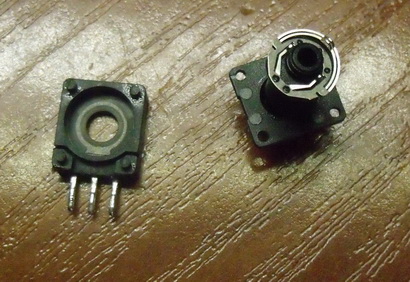
but I like use regular hall's to recovery pots(for secondary axis):


Joined: Jan 2010
Posts: 464
T
Member
Member
T Offline
Joined: Jan 2010
Posts: 464
Thanks mega_mozg.

how do you connect GEN, SCK, SC and MISO from TLE5010 board to Arduino Leonardo?

Joined: Jan 2011
Posts: 658
B
BS 62 "Pegasus" CAG
Member
BS 62 "Pegasus" CAG
Member
B Offline
Joined: Jan 2011
Posts: 658
Thanks sokol


"When you plan revenge best dig two graves" Confucius
"They who can give up essential liberty to obtain a little temporary safety, deserve neither liberty nor safety" Benjamin Franklin
Joined: Jan 2004
Posts: 1,222
Likes: 2
More projects than sense!
Member
More projects than sense!
Member
Joined: Jan 2004
Posts: 1,222
Likes: 2
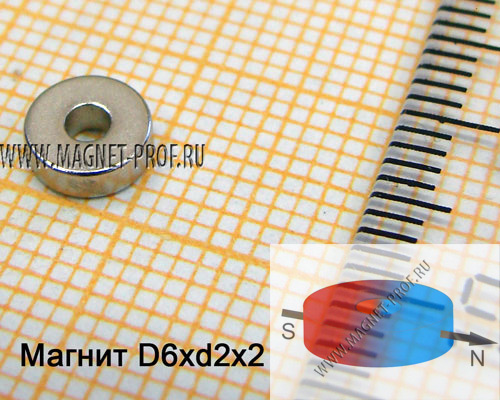
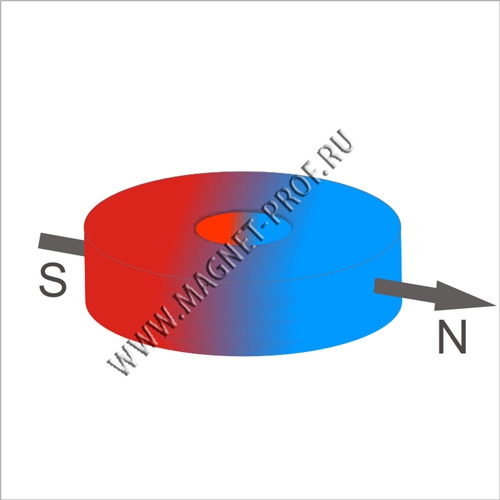
That's interesting. I've never seen disc magnets built like that - typically the poles of the magnet are the top & bottom surfaces of the disc, not splitting it vertically.

g.


Proud owner of 80-0007
http://www.f15sim.com - The only one of its kind.
http://geneb.simpits.org - the Me-109F/X Project
Joined: Aug 2007
Posts: 293
B
Member
Member
B Offline
Joined: Aug 2007
Posts: 293
I think these are the type of magnet used in "pancake style" pager motors, that you can find on a few cellphone.
[edit] I found a picture that explains what type of motors I mean:

Last edited by Brandano; 03/30/15 11:36 PM.
Joined: Jan 2014
Posts: 274
M
Member
Member
M Offline
Joined: Jan 2014
Posts: 274
Originally Posted By: tirta
how do you connect GEN, SCK, SC and MISO from TLE5010 board to Arduino Leonardo?

sample how

Joined: Jan 2014
Posts: 274
M
Member
Member
M Offline
Joined: Jan 2014
Posts: 274
Originally Posted By: f15sim
I've never seen disc magnets built like that - typically the poles of the magnet are the top & bottom surfaces of the disc, not splitting it vertically.


diametrical polarization


Joined: Feb 2011
Posts: 31
T
Junior Member
Junior Member
T Offline
Joined: Feb 2011
Posts: 31
Originally Posted By: f15sim
That's interesting. I've never seen disc magnets built like that - typically the poles of the magnet are the top & bottom surfaces of the disc, not splitting it vertically.
g.


Hi Gene,

In the past, I've managed to acquire some from Supermagnetman, in Birmingham, Alabama. (... had them shipped to a friend in TX, who, when visiting, brought them to Brazil, where I live. Now, the company has international shipping)

They usually have an option of across diameter or across "thickness" for the disc magnets.
http://www.supermagnetman.net/product_info.php?manufacturers_id=&products_id=188
http://www.supermagnetman.net/product_info.php?products_id=187

Hope it helps.

BTW, how's that sensor bracket you were working on? Did you finish it?

t� mais
tityus

Page 15 of 112 1 2 … 13 14 15 16 17 … 111 112

Moderated by  RacerGT 

Link Copied to Clipboard
Quick Search
Recent Articles
Support SimHQ

If you shop on Amazon use this Amazon link to support SimHQ
.
Social


Recent Topics
Cydonia Mars
by Terl9999 - 10/01/26 07:22 AM
Steam vs GOG
by Terl9999 - 09/30/26 09:04 PM
It has been a long absence
by Snow46 - 09/30/26 07:36 PM
SpaceX Starship Going to Orbit
by F4UDash4 - 09/28/26 12:37 PM
God Forbid they want to have a bit of fun at work
by NoFlyBoy - 09/22/26 08:50 PM
How a 5" 38 Caliber US Naval Gun Works
by F4UDash4 - 09/19/26 01:20 AM
100% commission based sales
by PanzerMeyer - 09/18/26 04:47 PM
Relativity
by Terl9999 - 09/18/26 04:34 AM
HOA's
by Terl9999 - 09/18/26 04:12 AM
Football
by Terl9999 - 09/18/26 02:42 AM
Popular Topics(Views)
7,075,938 SAM Simulator
Copyright 1997-2016, SimHQ Inc. All Rights Reserved.

Powered by UBB.threads™ PHP Forum Software 8.0.1