|
|
Joined: Jul 2010
Posts: 1,256
Member
|
|
Member
Joined: Jul 2010
Posts: 1,256 |
I would like to edit squad/ace default skins. What files do I need to change? I know you can edit all the skins for your flight directly in the mission file itself, though would be nice if you could do it once and have it saved for all subsequent missions (but I haven't figured that one out yet). Maybe there is a line in the overall campaign file for the persona/character? Another question on residual mission files:I have what I think are some lingering mission report files in the RoF\data folder that I think are interfering with the campaign autogenerated post-mission report since I am offered multiple report "dates" to choose from in a drop down menu when I click the auto-report button. I need to know if I can/should delete these: MissionParserLog.txt missionReport(2011-02-05_20-21-30)[0].txt <<<<there is only one of these (as opposed to dozens I've seen in other missions), so I suspect it is a partial/fragment from a previous or incomplete mission, i.e. one I had to quit early to kill vegetative dithering--gods what a terrible idea that was! Once a report is logged within the campaign these txt files seem to be autodeleted, for the most part... Little nigglies, but a helluva lot better than manual!!! Thanks Pat!
4x2.66 GHz Xeons, XFX 4870 1 GB, 11 GB DDR2 RAM, Win7 Pro x64, 120 GB OCZ Vertex2 (MLC, Sandforce)
26" VIZIO 1920x1200, Logitech FF 3D Pro, CH pedals, Track IR4
|
|
|
|
|
Joined: Jul 2010
Posts: 1,256
Member
|
|
Member
Joined: Jul 2010
Posts: 1,256 |
Ok, hate to overwhelm the thread, but this has been a pet peeve for some time. How do I get rid of all the "waypoint" text on the mission map? I mean, I know the turns are waypoints, right? Not all RoF missions have them on their maps, they are nice and clean, so there must be a way to not implement them... ? 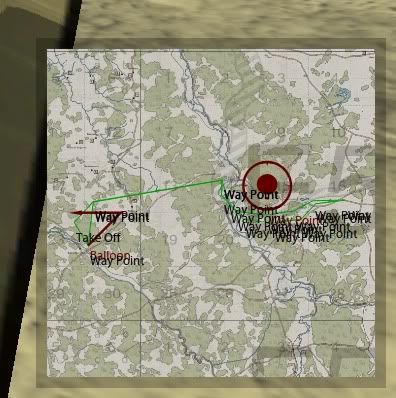
4x2.66 GHz Xeons, XFX 4870 1 GB, 11 GB DDR2 RAM, Win7 Pro x64, 120 GB OCZ Vertex2 (MLC, Sandforce)
26" VIZIO 1920x1200, Logitech FF 3D Pro, CH pedals, Track IR4
|
|
|
|
|
Joined: Dec 2000
Posts: 3,118
Senior Member
|
|
Senior Member
Joined: Dec 2000
Posts: 3,118 |
That must be a settings issue in RoF - maybe in the icons settings.
I play full switch and have never seen labels on the maps only icons placed there by the mission file
|
|
|
|
|
Joined: Feb 2005
Posts: 1,287 Likes: 1
Member
|
|
Member
Joined: Feb 2005
Posts: 1,287 Likes: 1 |
Talking about assigning skins to aces... Check out this beta tool, created by Ansirial for this purpose. Only German aces are covered at the moment... D/L link and further info, at the post by Ansirial at the Official Forums RoF Campaign thread: http://riseofflight.com/Forum/viewtopic.php?f=279&t=4319&p=217184#p217184 
WOFF UE, BOC member, Albatros pilot.
|
|
|
|
|
Joined: Jul 2010
Posts: 1,256
Member
|
|
Member
Joined: Jul 2010
Posts: 1,256 |
No map icons turned on here. As I mentioned, I don't see the "waypoint" text except in Pat's campaign missions. I'm perplexed.
4x2.66 GHz Xeons, XFX 4870 1 GB, 11 GB DDR2 RAM, Win7 Pro x64, 120 GB OCZ Vertex2 (MLC, Sandforce)
26" VIZIO 1920x1200, Logitech FF 3D Pro, CH pedals, Track IR4
|
|
|
|
|
Joined: Dec 2008
Posts: 2,939
Senior Member
|
|
Senior Member
Joined: Dec 2008
Posts: 2,939 |
Ive been using Pats Generator now for a few weeks and loving it.
Im a little lost in this thread. If I understand this now, Is there now a way that the campaign generator uses a text file generated by ROF after every mission and there is no longer a need to manually enter the mission results? If this is so, how does one enable this?
Rob
Intel Core i7-3770K
GB (4 x 4GB) 240-Pin DDR3 SDRAM DDR3 2000 (PC3 16000)
MSI GTX 960 GTX 4GB
|
|
|
|
|
Joined: Aug 2003
Posts: 1,194
Member
|
|
Member
Joined: Aug 2003
Posts: 1,194 |
Ok, hate to overwhelm the thread, but this has been a pet peeve for some time. How do I get rid of all the "waypoint" text on the mission map? I mean, I know the turns are waypoints, right? Not all RoF missions have them on their maps, they are nice and clean, so there must be a way to not implement them... ? I've been getting this as well since using v7. Haven't worked out a way to clear the text yet. I don't use icons so I don't think that's the issue either. WB.
I'm Spartacus.
|
|
|
|
|
Joined: Aug 2003
Posts: 1,194
Member
|
|
Member
Joined: Aug 2003
Posts: 1,194 |
It might be worth checking which version people are downloading. The link on page one of this thread appears to still link to v6.1. I used this link and then wondered why the auto mission results weren't working. I checked and realised I was still running 6.1. I then went in to WoH forums and downloaded from there and it was the correct version.
Hope that helps,
WB.
I'm Spartacus.
|
|
|
|
|
Joined: Aug 2003
Posts: 1,194
Member
|
|
Member
Joined: Aug 2003
Posts: 1,194 |
Ive been using Pats Generator now for a few weeks and loving it.
Im a little lost in this thread. If I understand this now, Is there now a way that the campaign generator uses a text file generated by ROF after every mission and there is no longer a need to manually enter the mission results? If this is so, how does one enable this?
Rob Scoobe, go to the configuration page of Pats Generator, at the top of the list is an entry titled 'Automatic Mission Results Directory', enter the path for the data folder within your RoF directory and that should solve your problem. WB
I'm Spartacus.
|
|
|
|
|
Joined: Jan 2007
Posts: 793
Member
|
|
Member
Joined: Jan 2007
Posts: 793 |
Using automatic mission results:
Make sure that mission results output is enabled in Startup.cfg, otherwise mission results fiels will not be created. The game dumps them in the <rof dir>\data directory so that is what you configure RoFCampaign to look at.
Waypoint icons:
I do create waypoint icons for each waypoint. They can be deleted form themission file manually. I do not currently have logic in place tomake them optional, but tha can be done. These icons have been in place for a long time and don't think that I do anything different.
Assigning squadron skins:
Create a skin with the pilots name. It wll be used by default. The same is true of your pilot and aces.
|
|
|
|
|
Joined: Jan 2007
Posts: 839
Member
|
|
Member
Joined: Jan 2007
Posts: 839 |
Regarding the icons, is it possible that their NAME is set to 'Way point'? IF i remember well, unlike other mission editor objects, Translator Icons were different in that their "name" was that displayed on the map, instead of a description or other string that would had to be taken from the localisation files. To show nothing, the translator icon name should be empty or smthing like that. If not applicable, pls ignore this 
|
|
|
|
|
Joined: Apr 2004
Posts: 2,426
Member
|
|
Member
Joined: Apr 2004
Posts: 2,426 |
Love the automated reports...starting to feel like the real deal now...the thing it's lacking is more planes!!!
|
|
|
|
|
Joined: Apr 2004
Posts: 2,426
Member
|
|
Member
Joined: Apr 2004
Posts: 2,426 |
Also as RoF seems very intensive on our rigs and with the RoF campaign generator even more so I wonder if it would be better if we had hidden triggers to bring in enemy flights this would ease the demands put on our PC's? It would be great aswell if the triggers had a probability rating of whether an enemy flight is brought into the fray. Also the triggers could be placed not just along the waypoint route but further afield aswell incase you stray of the beaten path.
|
|
|
|
|
Joined: Feb 2005
Posts: 1,287 Likes: 1
Member
|
|
Member
Joined: Feb 2005
Posts: 1,287 Likes: 1 |
Using automatic mission results:
Make sure that mission results output is enabled in Startup.cfg, otherwise mission results fiels will not be created. The game dumps them in the <rof dir>\data directory so that is what you configure RoFCampaign to look at.
Waypoint icons:
I do create waypoint icons for each waypoint. They can be deleted form themission file manually. I do not currently have logic in place tomake them optional, but tha can be done. These icons have been in place for a long time and don't think that I do anything different.
Assigning squadron skins:
Create a skin with the pilots name. It wll be used by default. The same is true of your pilot and aces. Thanks Pat ! Don't you think that those details should have been in the Read Me? For example in the Read Me says: "assign custom skins to your squadmates and aces", but It doesn't say how! Again with the auto generated results the info about how to enable the feature properly is lacking... 
WOFF UE, BOC member, Albatros pilot.
|
|
|
|
|
Joined: Jan 2001
Posts: 2,676 Likes: 1
Senior Member
|
|
Senior Member
Joined: Jan 2001
Posts: 2,676 Likes: 1 |
Pat:
Thanks for the clarification. I have a few questions regarding file additions/edits:
- Is adding aces as easy as copying over the format and changing name/dates?
- Is code spacing important? So - it can't look like:
Ace
{
Name = "Fritz Rumey";
Nation = 501;
Skins
{
Skin
{
Name = "";
Date = 01/08/1915;
}
}
- but must have indents?
- If that is the case, will using WordPad be good enough to keep all spacing nicey/nice?
Thanks.
BTW, found an error in the ACE file. Rickenbacker is missing a "4" - for 94th Aero - for his squad assignment - it is one digit short.
Last edited by Barkhorn1x; 02/07/11 07:15 PM.
"It is useless for the sheep to pass resolutions in favor of vegetarianism, while the wolf remains of a different opinion."--- William Ralph Inge
"The ORIGINAL Barkhorn"
|
|
|
|
|
Joined: Jan 2001
Posts: 25,177 Likes: 2
Lifer
|
|
Lifer
Joined: Jan 2001
Posts: 25,177 Likes: 2 |
It's a shame, I just wanted to give 7.0 a try but I have no time (and to be honest, not much inclination) to register at yet another website and wait for the process. Does anyone have a direct DL link, or maybe can someone mail me the files at helmut (at) shotbyme.at?
regards
|
|
|
|
|
Joined: Jan 2001
Posts: 2,676 Likes: 1
Senior Member
|
|
Senior Member
Joined: Jan 2001
Posts: 2,676 Likes: 1 |
It's a shame, I just wanted to give 7.0 a try but I have no time (and to be honest, not much inclination) to register at yet another website and wait for the process. Does anyone have a direct DL link, or maybe can someone mail me the files at helmut (at) shotbyme.at?
regards
I'll send you the file this evening.
"It is useless for the sheep to pass resolutions in favor of vegetarianism, while the wolf remains of a different opinion."--- William Ralph Inge
"The ORIGINAL Barkhorn"
|
|
|
|
|
Joined: May 2007
Posts: 177
Wings Of Honor Member
|
|
Wings Of Honor Member
Joined: May 2007
Posts: 177 |
It's a shame, I just wanted to give 7.0 a try but I have no time (and to be honest, not much inclination) to register at yet another website and wait for the process. Does anyone have a direct DL link, or maybe can someone mail me the files at helmut (at) shotbyme.at?
regards
If you put down Wings Of Honor as 'yet another website' then it is better you do not register in the forums. It is the only active site I know of dedicated solely to W.W.I flight simulations. Countless hours of work have gone in my site during its 10 years of existence with little feedback from people. But no feedback is better than a feedback like yours with just putting down the site. And, excuse me, but I wanted to make it easier for me and for the file authors to upload and manage their files by themselves instead of waiting until I have uploaded and published their files the 'classic way'. It is not only the forums but the whole site with its information, news and downloads which take up my time and my money and I do not want anything in return. Bye
|
|
|
|
|
Joined: Jan 2001
Posts: 2,676 Likes: 1
Senior Member
|
|
Senior Member
Joined: Jan 2001
Posts: 2,676 Likes: 1 |
Damn. Can't believe I almost missed this - thanks El. Looks real easy to add to entries to the ACES file. My plan is to add entries to Pat's ACE file - and add entries to Ansirial's ACES file giving myself a historical unit roster for Jasta 5, circa mid - 1917. I'll let all know if it works.
"It is useless for the sheep to pass resolutions in favor of vegetarianism, while the wolf remains of a different opinion."--- William Ralph Inge
"The ORIGINAL Barkhorn"
|
|
|
|
|
Joined: Aug 2003
Posts: 1,194
Member
|
|
Member
Joined: Aug 2003
Posts: 1,194 |
It's a shame, I just wanted to give 7.0 a try but I have no time (and to be honest, not much inclination) to register at yet another website and wait for the process. Does anyone have a direct DL link, or maybe can someone mail me the files at helmut (at) shotbyme.at?
regards
Check your mail. WB. PS. Apologies Barkhorn1x email was composing as you posted your reply.
I'm Spartacus.
|
|
|
|
|
|
|
|
|
|
|
|
|
HOA's
by Terl9999 - 09/18/26 04:12 AM
|
Football
by Terl9999 - 09/18/26 02:42 AM
|
Flags
by Terl9999 - 09/15/26 10:03 PM
|
|
|
|
|
|
|
|



