|
|
Joined: Jan 2010
Posts: 464
Member
|
|
Member
Joined: Jan 2010
Posts: 464 |
thanks Sokol1 for the explanation.
I notice there is also "filter " for axis.
what does it do?
|
|
|
|
|
Joined: Jan 2014
Posts: 274
Member
|
|
Member
Joined: Jan 2014
Posts: 274 |
tirta, filter is smoothing (cut signal noise).
|
|
|
|
|
Joined: Jan 2010
Posts: 464
Member
|
|
Member
Joined: Jan 2010
Posts: 464 |
thanks mega_mozg,
I am using hall effect sensor, do I need to use it?
|
|
|
|
|
Joined: Nov 2001
Posts: 3,960
Senior Member
|
|
Senior Member
Joined: Nov 2001
Posts: 3,960 |
Tirta, Test your "joystick" with JoyTester2, VKB joystester (or Tm Joy Analyzer), if without move the axis the response line became "serrated" apply the filter, if not is no need. The two first programs here, in Mercury13 page (Analyzer from Thrustmaster page): http://mercury13.tut.su/?q=soft_otherOr http://ftp.vkb-sim.pro/Programms/Sokol1
Last edited by Sokol1; 12/06/14 03:10 PM.
|
|
|
|
|
Joined: Jan 2014
Posts: 274
Member
|
|
Member
Joined: Jan 2014
Posts: 274 |
my collection of tools for joysticks "all in one" [MMJOY downloads] -> [tools_joy.rar]
|
|
|
|
|
Joined: Jan 2010
Posts: 464
Member
|
|
Member
Joined: Jan 2010
Posts: 464 |
thanks Sokol1 for the reply.
thanks mega_mozg for the files.
I am going to do some testing now.
|
|
|
|
|
Joined: Jan 2010
Posts: 464
Member
|
|
Member
Joined: Jan 2010
Posts: 464 |
Hi mega_mozg,
Hi Sokol1,
I have another problem when connecting the cables for button matrix from the throttle unit to the joystick unit.
My old version, I connect the cables directly from the throttle button to mmjoy.
There is no problem, everything work fine this way.
Now, since I want to make the joystick interchangeable.
I use db15 connector in between throttle and joystick unit (mmjoy is inside joystick unit),
so that I can use another joystick with the same throttle.
However with these connectors (male and female). it seems that connections are never good,
Testing with joysetup.exe, when I press the one button, always 2 or 3 numbers are checked.
Bad connector? may be,
but I have changed both male and female parts 2 times with new parts,
the result is still the same.
I have double check all cables connection, with multimeter there seems nothing wrong.
However, if I do not use the connector at all,
all the buttons are good, always one number for one button pressed.
Why is that?
Do you know what is the culprit?
And what is button debounce?
what does it do?
Last edited by tirta; 12/12/14 11:01 AM.
|
|
|
|
|
Joined: Aug 2014
Posts: 17
VR guy Junior Member
|
|
VR guy Junior Member
Joined: Aug 2014
Posts: 17 |
Hi mega_mozg_13, I saw your conversion of the Saitek X36/X35. Do you think it's also possible to do a less invasive conversion leaving the wiring of the stick and throttle unchanged and only add an Arduino with MMJoy in the base of the joystick? Also thanks for the detailed flashing instructions in your posting Btw, have you seen the new dirt cheap "Nano 3.0 CH340" boards on AliExpress? You can get them for around $3.20 with shipping, or $2.60 if you buy ten.
Last edited by Lorphos; 12/12/14 02:31 PM.
|
|
|
|
|
Joined: Nov 2001
Posts: 3,960
Senior Member
|
|
Senior Member
Joined: Nov 2001
Posts: 3,960 |
, when I press the one button, always 2 or 3 numbers are checked.
You are using diodes on buttons? When using many inputs from matrix they are need to avoid "ghost" buttons press. 1N4148 diode is fine. Sokol1
|
|
|
|
|
Joined: Jan 2010
Posts: 464
Member
|
|
Member
Joined: Jan 2010
Posts: 464 |
yes I use 1N4148 diode.
I am thinking of buying another pair of db15 connector [male and female], might be a better quality ones.
It seems that all 2 pairs that I have are bad.
it seems unlikely,
but that is the most logical explanation so far.
|
|
|
|
|
Joined: Jan 2014
Posts: 274
Member
|
|
Member
Joined: Jan 2014
Posts: 274 |
I saw your conversion of the Saitek X36/X35. Do you think it's also possible to do a less invasive conversion leaving the wiring of the stick and throttle unchanged and only add an Arduino with MMJoy in the base of the joystick?
it was a more then year ago... I don't remember. Btw, have you seen the new dirt cheap "Nano 3.0 CH340" boards on AliExpress? "Nano 3.0 CH340" not supported (MCU "ATmega328P" without USB interface).
Last edited by mega_mozg_13; 12/14/14 05:55 AM.
|
|
|
|
|
Joined: Jan 2010
Posts: 464
Member
|
|
Member
Joined: Jan 2010
Posts: 464 |
Hi mega_mozg, Hi sokol1, Finally I manage to get rid of the "ghost button presses" by adding the pull up resistor 10k to each column. Thanks for letting me know. Now with firmware v20141119, I find out that the axis value on the "Joystick axes" page is different than "Joy-tester" page. So which one is the correct one? 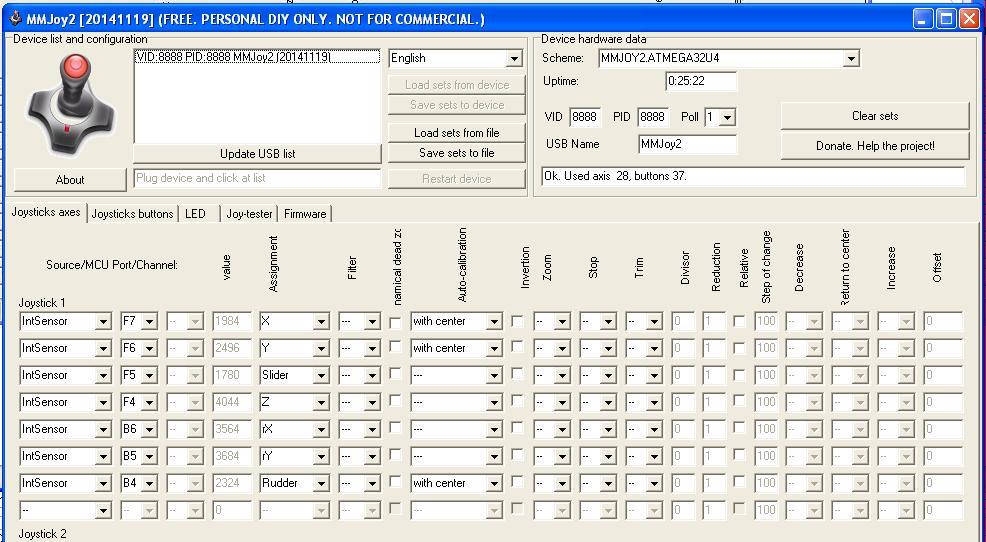 min center max X 122 2059 3975 these values from Joy-tester > raw X 676 1984 3308 these values from Joystick axes > value Y 161 2168 3866 these values from Joy-tester > raw Y 1724 2496 3180 these values from Joystick axes > value 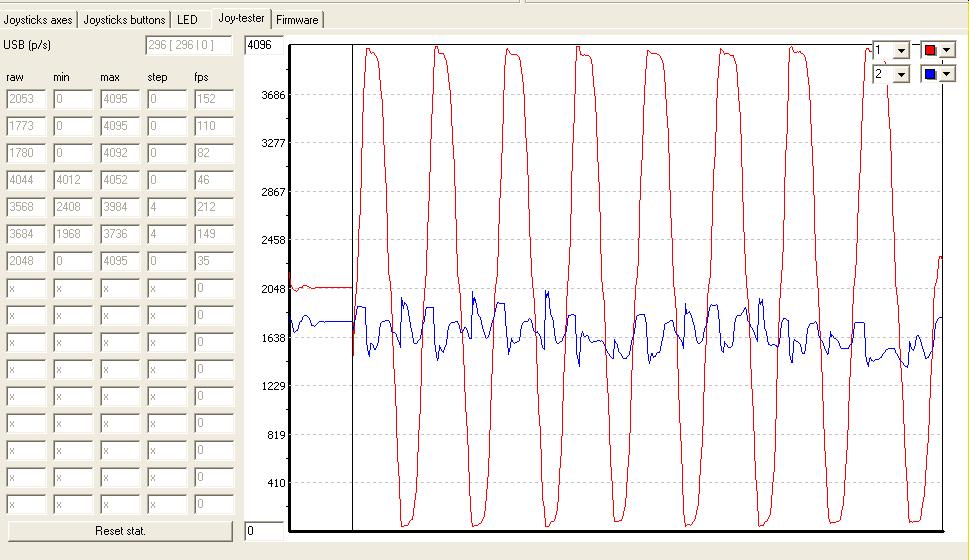 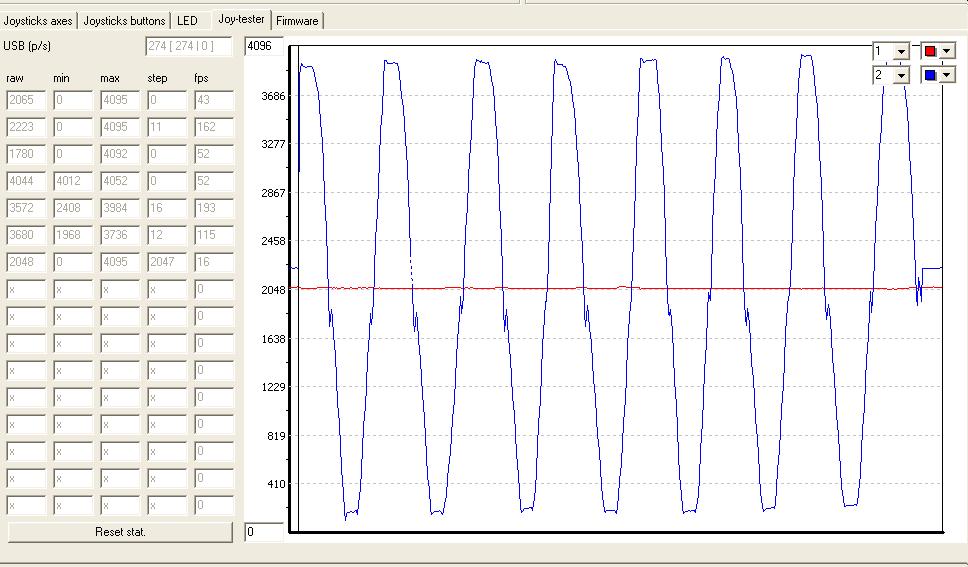 I use hall sensor for both x and y. Are these values good enough? or do I need to better align the magnet - hall sensor? Also I have enabled the auto calibration w/center for both axis, but when I look at control panel > game controller, I find the axis is not centered. 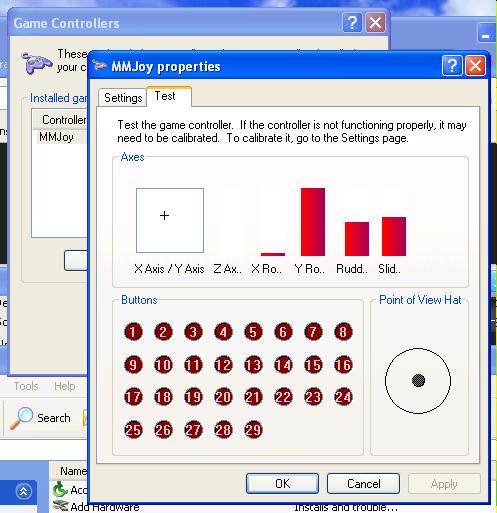 Then I calibrate it from setting > calibrate, but it seem the result is not optimal, the axis is still not centered.  Please let me know what is wrong and how to fix it.
|
|
|
|
|
Joined: Nov 2001
Posts: 3,960
Senior Member
|
|
Senior Member
Joined: Nov 2001
Posts: 3,960 |
The reading values - above 3000 are very good, don't worry with this.
Try this: open the device (joystick ?) plug into computer USB port and careful move the magnets until the axis are centered (more approximately possible).
Instead monitor on Windows applet use one these joy test software, like this one in your above pictures, more detailed.
The center is in 2048. The blue axis -static on second picture - is clearly off center.
The "Achilles hell" of DIY HALL sensor assembly is this alignment, a 0.1 mm off make difference in centering.
Sokol1
|
|
|
|
|
Joined: Jan 2014
Posts: 274
Member
|
|
Member
Joined: Jan 2014
Posts: 274 |
tirta, your hall+magnet system works ery well. if want more, and perfect: 1) decrease distance between hall and magnet as less as possible. axis raw must be: min 0-100 point, and max 4000-4096. 2) check your mechanic   it is no good!!! see my bearings mechanic: 
|
|
|
|
|
Joined: Jan 2010
Posts: 464
Member
|
|
Member
Joined: Jan 2010
Posts: 464 |
thanks Sokol1 & mega_mozg for sharing your knowledge.
I learn a lot from reading your posts.
mega_mozg,
your joystick motion looks very smooth.
can I know what kind of joystick do you use?
|
|
|
|
|
Joined: Jan 2014
Posts: 274
Member
|
|
Member
Joined: Jan 2014
Posts: 274 |
mega_mozg, your joystick motion looks very smooth. can I know what kind of joystick do you use?
|
|
|
|
|
Joined: Jun 2007
Posts: 637
Sith Lord Member
|
|
Sith Lord Member
Joined: Jun 2007
Posts: 637 |
Ok, I'm gonna take another shot at this even though my last mjoy attempt was an utter failure. Will this board work with MMJoy? http://www.ebay.ca/itm/Leonardo-Pro-Micr...=item4853468c6a
Ours is not to reason why. Ours is to do or die.
Tennyson
I have slipped the surly bonds of earth
And danced the skies on laughter-silvered wings..
Gillespie Magee, RCAF
|
|
|
|
|
Joined: Jun 2007
Posts: 637
Sith Lord Member
|
|
Sith Lord Member
Joined: Jun 2007
Posts: 637 |
guys, you are killing me by USBASP...
use bootloader, it easy!!!
0) connect leonardo to USB, windows ask for drivers. Use it from subfolder 'JoySetup' -> 'drivers'.
1) open "device manager" -> "LPT/COM ports". somevere will be "Arduino leonardo COMxx". warning "COMxx"!!!
2) click "reset"+"gnd" pins twice, "Arduino leonardo COMxx" - remove and windows ask for new device and drivers.
3) on "device manager" -> "LPT/COM ports". will be NEW "Arduino leonardo bootloader COMyy". warning "COMyy"!!!
!!!remember bootloader mode active only 8 sec, after leonardo automaticly reset to "Arduino leonardo"!!!
so for update firmware you need a active state "Arduino leonardo bootloader COMyy".
4) start JoySetup, manual select: chip "atmega32u4", file firmware "Firmware_lufa_[MMJOY2.ATMEGA32U4].hex", boot type "Arduino", and COM port. where "COMyy" - bootloader port number "YY".
5) again goto bootloader mode "click "reset"+"gnd" twice".
6) when field port are green it is ready to update just click "upload firmware". Holy #%&*$#. So with any pro micro you DON"T need a progammer (I have an avrisp - no idea how to use it)? All I have to do is follow the above steps to get it to work? Also, in order for this to work, do steps 4-6 have to be done within 8 seconds or can you start Joysetup and get everything ready, then plug in the promicro and click "upload"?
Last edited by Ltfransky; 12/18/14 07:46 PM.
Ours is not to reason why. Ours is to do or die.
Tennyson
I have slipped the surly bonds of earth
And danced the skies on laughter-silvered wings..
Gillespie Magee, RCAF
|
|
|
|
|
Joined: Jan 2010
Posts: 464
Member
|
|
Member
Joined: Jan 2010
Posts: 464 |
mega_mozg, your joystick motion looks very smooth. can I know what kind of joystick do you use? hi mega_mozg, wow, I am speechless. you make your own gimbal mechanism. that is very impressive.  how long does it takes to make it?
|
|
|
|
|
Joined: Jan 2014
Posts: 274
Member
|
|
Member
Joined: Jan 2014
Posts: 274 |
|
|
|
|
|
|
|
|
|
|
|
HOA's
by Terl9999 - 09/18/26 04:12 AM
|
Football
by Terl9999 - 09/18/26 02:42 AM
|
Flags
by Terl9999 - 09/15/26 10:03 PM
|
|
|
|
|
|
|
|
|
|



