|
|
Joined: Feb 2005
Posts: 1,287 Likes: 1
Member
|
|
Member
Joined: Feb 2005
Posts: 1,287 Likes: 1 |
I have a skin question myself... I started a brand new Campaign with Jasta 37 and tried to edit some real life pilots and assign them personal skins. I also edited the Squadron file in order to assign the D.V to Jasta 37 from September (default is November). I generated a mission and saw that my changes has been realised except from the personal paint schemes, (Jasta's default skin was assigned to every plane)... Here is my edit of my Campaign file. Am I doing something wrong? Pilot
{
Name = "Hans Waldhausen";
Rank = "Leutnant";
Picture = "German29";
Region = "";
Status = 0;
Missions = 50;
Aggressiveness = 0;
Skill = 3;
Sense = 0;
Skins
{
Skin
{
Name = "501037_Waldhausen";
Date = 01/08/1915;
}
}
Victories
{
Victory
{
Type = "Enemy Aircraft";
Date = 22/08/1917;
}
Victory........ Please Pat, is ther any way to make custom skin assignement a little less tricky?
And one time more, with my default highest resolution of 1600x900 I can't see fully some of the RoF CG screens!  PLEASE!!!PS: PLEASE!!!PS:It seems that exiting RoF CG and rebooting it, solved my skin assignment "problem"... If any of you want to assign custom skins to your virtual squadmates, the above edit of the Campaign file does the job, after all, but... The take off Demon strikes again!Hans Waldhausen merged with the wind indicator post. 
Last edited by elephant_; 10/01/11 09:30 PM.
WOFF UE, BOC member, Albatros pilot.
|
|
|
|
|
Joined: Jan 2007
Posts: 793
Member
|
|
Member
Joined: Jan 2007
Posts: 793 |
I can do something to help with skin assignment. I tried to do somethnig with scroll bars awhile back and it did not turn out well. I can look into it again. Note to self - move the damned wind sock.
Last edited by PatrickAWilson; 10/01/11 09:50 PM.
|
|
|
|
|
Joined: Jan 2007
Posts: 793
Member
|
|
Member
Joined: Jan 2007
Posts: 793 |
|
|
|
|
|
Joined: Dec 2003
Posts: 2,151
Member
|
|
Member
Joined: Dec 2003
Posts: 2,151 |
Guys, how to install this campaign? I couldn't find it in the readme nor in the title post.
Thanks,
Dirk.
|
|
|
|
|
Joined: Jul 2010
Posts: 1,256
Member
|
|
Member
Joined: Jul 2010
Posts: 1,256 |
Installing Patrick Wilson's Campaign Mission GeneratorMake sure Java is installed on your computer and for the correct operating system, i.e. there is a 64 bit version. Download Link Here. Unzip Patrick Wilson's (PW) Campaign download and install the RoFCampaign folder only in your ... \Rise of Flight\ folder. This folder is the one with the .jar file & data & campaign folders, Pat may be using nested folders now to track version number so get only the right folder into the game. EDIT: Make sure you set the correct path for the Auto Results Directory when you set up the first time. On main PW screen go into Configuration\Advanced Config\Configuration Parameters:GUI and enter for the Mission Log File Directory the following: for a 64 bit system C:\Program Files (x86)\Rise of Flight\data or for 32 bit OS just C:\Program Files\Rise of Flight\data Now in the RoF game file ( don't look for it in the PW campaign data folder) ... \Rise of Flight\data\Startup.cfg scroll to near the bottom and ensure that mission_text_log = 1, edit with Notepad if necessary and save. Make a desktop shortcut to the RoFCampaign.jar, or set this file as a default start up option in your OS, this opens PW's campaign GUI. Don't expect the same level of GUI detail as the in-game 'Career Beta', Pat's missions are where it's at, and the ability to configure/scale the variables to your system. That should be it for install. Start a new campaign with a new pilot, choose a squadron etc. Click Generate a mission: - RoFCampaign generates a mission in the RoF Missions directory in the form <pilot name>.mission Leave PW's campaign GUI open, and start up Rise of Flight. Navigate to that mission and fly it. Once complete, accept the mission results. Alt-tab out of RoF, or quit game, and go back into PW's campaign GUI, and select Automatic results. If you flew more than once, there may be more than one mission results to choose from and it isn't simple to figure out which is which, so beware, fly a PW mission and go right back to PW GUI to avoid confusion. After you've 'uploaded' results into PW GUI, make sure you enter a report for the mission. I find it fun to go back and review past missions every now and then to keep in touch with my pilot, especially if you have several pilots on the go. Go into the ... \Rise of Flight\data\ folder and delete old mission results files. Delete all similar files after MissionParserLog.txt with the same extension (.txt I think?). Enjoy!
Last edited by Bandy; 10/02/11 01:35 PM.
4x2.66 GHz Xeons, XFX 4870 1 GB, 11 GB DDR2 RAM, Win7 Pro x64, 120 GB OCZ Vertex2 (MLC, Sandforce)
26" VIZIO 1920x1200, Logitech FF 3D Pro, CH pedals, Track IR4
|
|
|
|
|
Joined: Dec 2003
Posts: 2,151
Member
|
|
Member
Joined: Dec 2003
Posts: 2,151 |
I'll install it shortly. Just curious what to expect action wise in 3D and what is the addiction factor compared to career mode I should not overlook.
Thanks, Bandy.
Dirk.
Last edited by Dirk98; 10/02/11 10:49 AM.
|
|
|
|
|
Joined: Jul 2010
Posts: 1,256
Member
|
|
Member
Joined: Jul 2010
Posts: 1,256 |
Well, RoF career beta GUI is very nice, but I know in my head that action is based on triggers in certain locations along the flight path. Deviate from Career beta flight path and you're in empty space. I also find that I get a half-second stutter in Career Beta just before the AI spawns, likely skins uploading...
In a PW mission, if I get separated from my flight and set path, say due to flying around clouds while the AI charges through them (silly buggers), or after a dog fight, and I'm wandering around or lost, then you do not know where/when to expect the enemy. I got jumped one time while looking at the map trying to orient myself. Great stuff!
Pat's missions actually set all AI aircraft in the sky on a realistic flight path, and only when your path intersects one of theirs do they spawn. You can wander around within reason, check out a hidden scenic valley say (still love to do that), and perhaps still get action. You just never know.
Then there is the ability to scale the PW mission elements to suit your tastes/system resources, but try it out stock before you go into and edit the config file too much. And make sure you back it up before edits if you do...
4x2.66 GHz Xeons, XFX 4870 1 GB, 11 GB DDR2 RAM, Win7 Pro x64, 120 GB OCZ Vertex2 (MLC, Sandforce)
26" VIZIO 1920x1200, Logitech FF 3D Pro, CH pedals, Track IR4
|
|
|
|
|
Joined: Jul 2010
Posts: 1,256
Member
|
|
Member
Joined: Jul 2010
Posts: 1,256 |
Version 10 report: I've been trying out v10 on medium setting, and have had no stutters or performance slow downs at all, though I also have not had any encounters either. Flying for ESC 3 in April 1917, SPAD 180. Turning on A/C map icons, and rotating through AI aircraft views (shift + 2, control + 2), I see numerous French flights with up to 5 or 6 aircraft ( historical sized flights, yeah!) and a few German aircraft, but my flight has had no encounters, which is OK on occasion but not repeatedly. My flights have all been high altitude offensive patrols thus far, 3km or higher, so that may be the rub. Other aircraft were much lower, so I assume beyond visual range of my AI flight leader (I sadly spend most of my eye-time trying to keep in formation  ). Many flights were much further away than I expected, but this was towards the end of the mission. While poking around inside the config file, I see that: UseAirfieldMGs = 0;
UseMGs = 0;
UseScramble = 0;Which if I read correctly "= 0" means they are not implemented. Has the feature of spawning Airfield MG's only within a certain player proximity not worked? What is "UseMGs", MG's along the frontlines? Is there a performance or other reason "Scramble" missions are disabled by default? Inquiring minds need to know  Thanks Patrick!
4x2.66 GHz Xeons, XFX 4870 1 GB, 11 GB DDR2 RAM, Win7 Pro x64, 120 GB OCZ Vertex2 (MLC, Sandforce)
26" VIZIO 1920x1200, Logitech FF 3D Pro, CH pedals, Track IR4
|
|
|
|
|
Joined: Dec 2003
Posts: 2,151
Member
|
|
Member
Joined: Dec 2003
Posts: 2,151 |
Well, RoF career beta GUI is very nice, but I know in my head that action is based on triggers in certain locations along the flight path. Deviate from Career beta flight path and you're in empty space. I also find that I get a half-second stutter in Career Beta just before the AI spawns, likely skins uploading...
In a PW mission, if I get separated from my flight and set path, say due to flying around clouds while the AI charges through them (silly buggers), or after a dog fight, and I'm wandering around or lost, then you do not know where/when to expect the enemy. I got jumped one time while looking at the map trying to orient myself. Great stuff!
Pat's missions actually set all AI aircraft in the sky on a realistic flight path, and only when your path intersects one of theirs do they spawn. You can wander around within reason, check out a hidden scenic valley say (still love to do that), and perhaps still get action. You just never know.
Then there is the ability to scale the PW mission elements to suit your tastes/system resources, but try it out stock before you go into and edit the config file too much. And make sure you back it up before edits if you do... Very interesting, so PW's generator makes RoF missions work and feel more like flying missions in OFF3 campaign? Thanks, Dirk.
|
|
|
|
|
Joined: Jan 2007
Posts: 793
Member
|
|
Member
Joined: Jan 2007
Posts: 793 |
Bandy: look into the opposing flight odds and max opposing flights. Opposing flights are flights designed to intersect with your flight. Flights that are not opposing flights are more random. Opposing flights are there to increase (greatly) the odds of an encounter.
In my ideal world I do not have to worry about opposing flights or number of flights. I just schedule every squadron and let them fly. Such an environment would produce almost "you are there" results. No two flights would ever be the same. Unfortunately RoF cannot handle such a thing.
Thirteen years ago RB3D did handle just that. It did it by making other flights work on simplified processing (they were just moved along their way points) and they only spawned when close. In this manner many flights could be in the air but each used only nanoseconds of CPU time until they actually interacted with the player. I sincerely hope that RoF takes a similar approach in the future.
|
|
|
|
|
Joined: Dec 2003
Posts: 2,151
Member
|
|
Member
Joined: Dec 2003
Posts: 2,151 |
Bandy: look into the opposing flight odds and max opposing flights. Opposing flights are flights designed to intersect with your flight. Flights that are not opposing flights are more random. Opposing flights are there to increase (greatly) the odds of an encounter.
In my ideal world I do not have to worry about opposing flights or number of flights. I just schedule every squadron and let them fly. Such an environment would produce almost "you are there" results. No two flights would ever be the same. Unfortunately RoF cannot handle such a thing.
Thirteen years ago RB3D did handle just that. It did it by making other flights work on simplified processing (they were just moved along their way points) and they only spawned when close. In this manner many flights could be in the air but each used only nanoseconds of CPU time until they actually interacted with the player. I sincerely hope that RoF takes a similar approach in the future. A bubble of 40 miles would work great for RoF as there are no radars and other modern sensors. How does it work in CFS3/OFF though? I understand most of their planes fly on their own "flight plans". Cheers, Dirk.
|
|
|
|
|
Joined: Jul 2010
Posts: 1,256
Member
|
|
Member
Joined: Jul 2010
Posts: 1,256 |
Thanks Patrick, I'm going to give it some more time and missions before I start tinkering with the 'engine'. Just flew a 'balloon defense' mission, but the balloon was on enemy side. At least it didn't say balloon attack. I got wounded and landed, thinking I was on the right side of the lines, only to find out I was a prisoner... 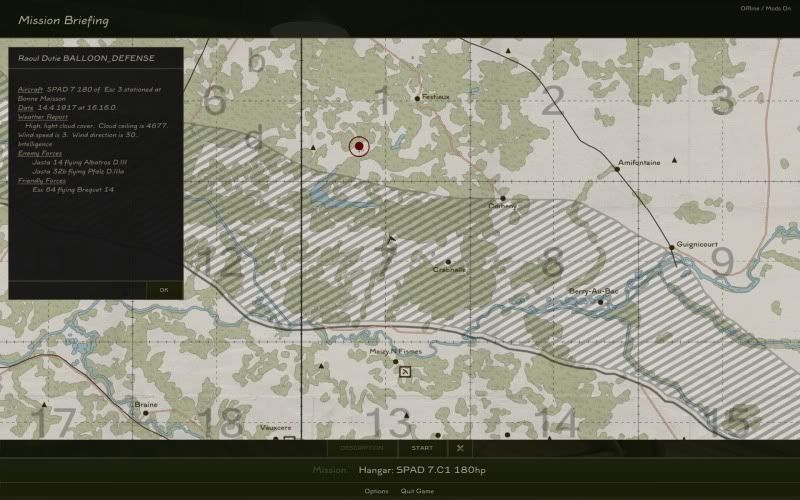
4x2.66 GHz Xeons, XFX 4870 1 GB, 11 GB DDR2 RAM, Win7 Pro x64, 120 GB OCZ Vertex2 (MLC, Sandforce)
26" VIZIO 1920x1200, Logitech FF 3D Pro, CH pedals, Track IR4
|
|
|
|
|
Joined: Jan 2007
Posts: 793
Member
|
|
Member
Joined: Jan 2007
Posts: 793 |
Hi all,
Until I can some proper documentation as to how the mission generatot works, I'm taking a break. I have just spent too much time trying to figure this thing out. The rules are arcane. I ask questions and nobody knows. Things that simply should work simply do not. Is it broken? Probably not if you can figure out the rules.
I do this part time, and I don't have that much time. I can't experiment and dig and hope for hours on end. I'll get back to it when somthing positive happens in terms of documentation.
|
|
|
|
|
Joined: Jun 2005
Posts: 8,471 Likes: 13
Hotshot
|
|
Hotshot
Joined: Jun 2005
Posts: 8,471 Likes: 13 |
Mate.. take a break.  We are a demanding bunch I know, but you do more than most to make this game better, and its all for our benefit, so thanks for the effort so far..
|
|
|
|
|
Joined: Feb 2005
Posts: 1,287 Likes: 1
Member
|
|
Member
Joined: Feb 2005
Posts: 1,287 Likes: 1 |
I second that... Thanks Pat! 
WOFF UE, BOC member, Albatros pilot.
|
|
|
|
|
Joined: Jul 2010
Posts: 1,256
Member
|
|
Member
Joined: Jul 2010
Posts: 1,256 |
Apologies for the abundant posts.
We are very passionate and get a bit hyperactive without our ritalin...
4x2.66 GHz Xeons, XFX 4870 1 GB, 11 GB DDR2 RAM, Win7 Pro x64, 120 GB OCZ Vertex2 (MLC, Sandforce)
26" VIZIO 1920x1200, Logitech FF 3D Pro, CH pedals, Track IR4
|
|
|
|
|
Joined: Jan 2007
Posts: 793
Member
|
|
Member
Joined: Jan 2007
Posts: 793 |
My frustration centers around the tool. The people are fine. As a software professional I expect to beheld to high standards. I also remain as passionate as ever about making RoFCampaign a something that the community truly enjoys.
During the development of version 10 I have spent so many hours trying to make the missions work as it seems they should work ... and they just dont. I want to KNOW how the mission generator will react so I can spend my time advancing the state of the software and not messing around with the mission generator.
|
|
|
|
|
Joined: Dec 2003
Posts: 2,151
Member
|
|
Member
Joined: Dec 2003
Posts: 2,151 |
Apologies for the abundant posts. Yes, otherwise...many thanks, and carry on!  Can't wait to try this flavor shortly. Cheers, Dirk.
Last edited by Dirk98; 10/03/11 10:10 PM.
|
|
|
|
|
Joined: Jun 2009
Posts: 317
Member
|
|
Member
Joined: Jun 2009
Posts: 317 |
I cant believe that Jason doesnt give you all the information that you require. I mean he said that having both campaigns is a good thing. Have you asked him directly?
|
|
|
|
|
Joined: Jan 2007
Posts: 793
Member
|
|
Member
Joined: Jan 2007
Posts: 793 |
Jason does give me support and I did get the answer. Not the one that I wanted but a proper and accurate answer anyway, and one worth sharing with other mission builders. Spawned units cannot fly waypoints or fly in formation.
I apologize but I was venting after too many hours of failure. I kept plugging because such a restriction never occurred to me, so I thought it must be me.
At any rate, 10.0 represents the best that I know how to do right now, and I do believe that it is a very significant improvement in terms of performace and ease of configuration. I'll keep on with performance and then try something that I have always want to do - a real GUI. That is absolutely not my strong opint but as a software profssional it is always fun to push on a weak point.
|
|
|
|
|
|
|
|
|
|
|
HOA's
by Terl9999 - 09/18/26 04:12 AM
|
Football
by Terl9999 - 09/18/26 02:42 AM
|
Flags
by Terl9999 - 09/15/26 10:03 PM
|
|
|
|
|
|
|
|
|
|



