|
|
Joined: Apr 2004
Posts: 2,426
Member
|
|
Member
Joined: Apr 2004
Posts: 2,426 |
When I open the config file in excel it's all messed up...anyone else have this problem?
|
|
|
|
|
Joined: Jan 2007
Posts: 793
Member
|
|
Member
Joined: Jan 2007
Posts: 793 |
When I open the config file in excel it's all messed up...anyone else have this problem? It's plain text
|
|
|
|
|
Joined: Feb 2006
Posts: 152
An Ace in de Skys Member
|
|
An Ace in de Skys Member
Joined: Feb 2006
Posts: 152 |
@ PW
I believe this may have been suggested before...but
We sure could use an elevator scroll bar on the 'Intelligence Report' page for the 'Opposing Squadrons' and 'Friendly Squadrons' tabs. I am flying my RoF sim on a Samsung B2230 Wide Flat Panel monitor with a screen resolution set to 1920x1080. There seems to be more information being written below the bottom of my maxed out 'Intelligence Report' page window.
Maybe this can be corrected by formatting the page with three columns instead of two to display a complete list of squadrons.
OlPaint
Within this vale
Of toil
And sin
Your head grows bald
But not your chin - use
Burma-Shave
|
|
|
|
|
Joined: Aug 2003
Posts: 1,194
Member
|
|
Member
Joined: Aug 2003
Posts: 1,194 |
I've got a minor glitch with the Top Aces screen. The hot spot for the 'OK' button seems to be overlapped by the bottom listed Ace. The overall spacing on the board seems a little odd as well. I've tried changing the font size but it has no effect, each line of text seems to have multiple lines between them. 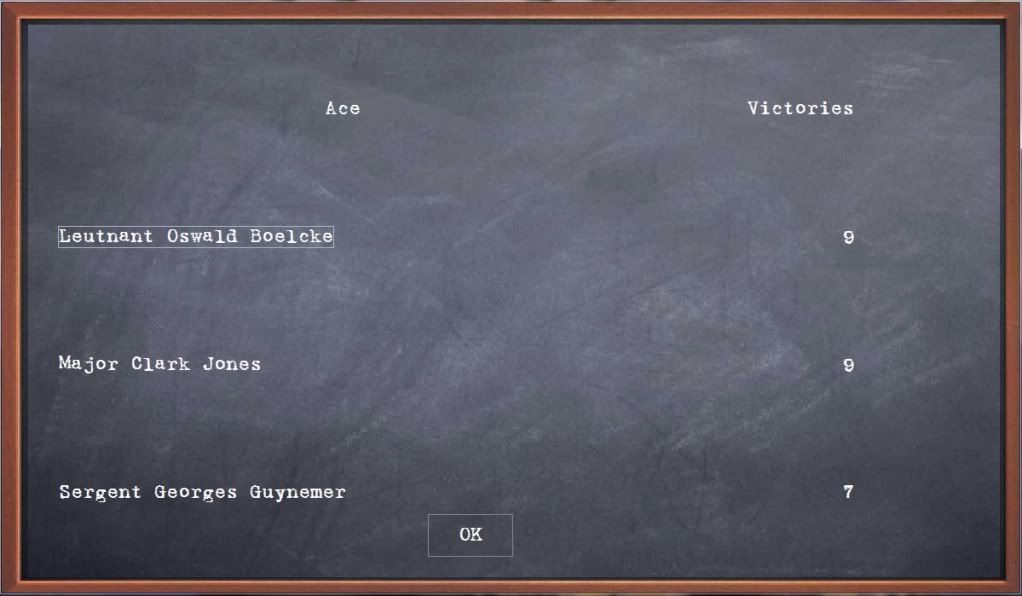 Any ideas? WB.
I'm Spartacus.
|
|
|
|
|
Joined: Feb 2006
Posts: 152
An Ace in de Skys Member
|
|
An Ace in de Skys Member
Joined: Feb 2006
Posts: 152 |
@ Whiskey
Check your Configuration page Chalkboard Font (item 2) value. It is 'Freestyle Script' in my default setup. Also the Chalkboard Font Size (item 5) is set to '30' in my default. It might be that you do not have that 'Freestyle Script' font in your type listing and the O/S is substituting plain old 'Arial' font instead. Look in you word processor font list to be sure. The multiple spacing appears to be a display formatting issue. Change the font to a smaller one and reduce the font size and see what happens.
OlPaint
Last edited by OlPaint; 02/14/11 12:25 PM.
Within this vale
Of toil
And sin
Your head grows bald
But not your chin - use
Burma-Shave
|
|
|
|
|
Joined: Aug 2003
Posts: 1,194
Member
|
|
Member
Joined: Aug 2003
Posts: 1,194 |
Tried all that mate. The font I use is a chalkboard font which I prefer. Different font sizes have no effect. Out of interest, what does your screen look like? Here's mine with the default font set to size 12 in the configuration menu: 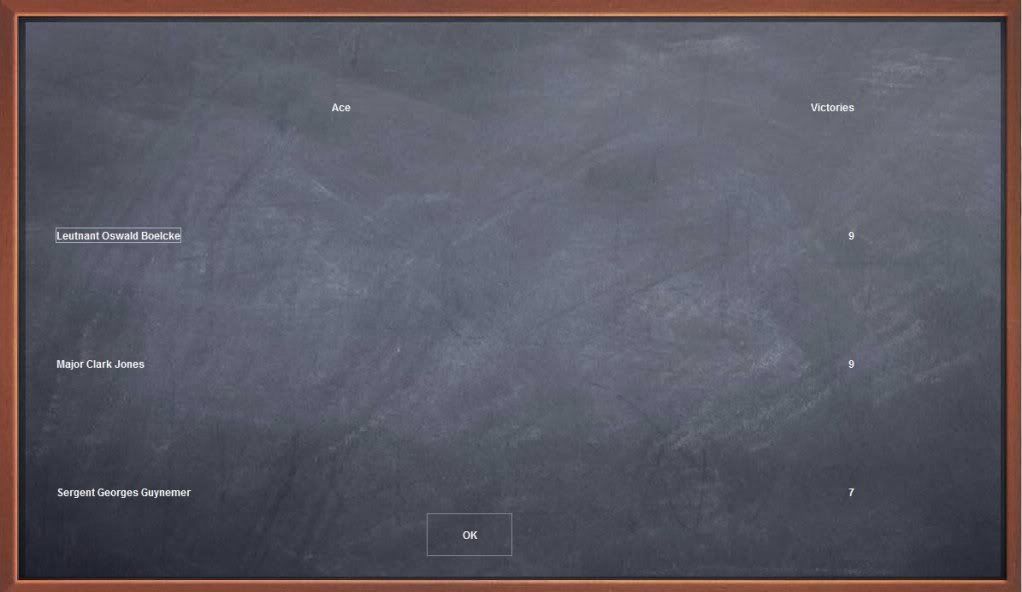 Cheers, WB.
I'm Spartacus.
|
|
|
|
|
Joined: Feb 2006
Posts: 152
An Ace in de Skys Member
|
|
An Ace in de Skys Member
Joined: Feb 2006
Posts: 152 |
@ Whiskey Here is what my Squadron page looks like straight out of the box:  OlPaint
Within this vale
Of toil
And sin
Your head grows bald
But not your chin - use
Burma-Shave
|
|
|
|
|
Joined: Aug 2003
Posts: 1,194
Member
|
|
Member
Joined: Aug 2003
Posts: 1,194 |
My Squadron page is fine also, it's my Top Aces page that is the problem. How is yours?
WB.
I'm Spartacus.
|
|
|
|
|
Joined: Aug 2003
Posts: 87
Junior Member
|
|
Junior Member
Joined: Aug 2003
Posts: 87 |
Whiskey,
Ive just checked my own squadron and top aces pages and they appear to be normal(spacing,etc.).The only thing i noticed was the bottom ace,(Billy Bishop) is slightly overlapping the,"OK", button but this happened in the last version also.
Hector
|
|
|
|
|
Joined: Aug 2003
Posts: 1,194
Member
|
|
Member
Joined: Aug 2003
Posts: 1,194 |
Kemal,
Thats the issue I'm talking about. The bottom ace overlaps the 'OK' hotspot which renders the OK button useless to me - I have to close the window using the top right x but this then also closes the program altogether.
It's no big deal, just thought I'd mention it that's all.
Cheers,
WB.
I'm Spartacus.
|
|
|
|
|
Joined: Aug 2003
Posts: 87
Junior Member
|
|
Junior Member
Joined: Aug 2003
Posts: 87 |
Cheers mate,sorry i couldnt offer any help
Hector
|
|
|
|
|
Joined: Aug 2003
Posts: 1,194
Member
|
|
Member
Joined: Aug 2003
Posts: 1,194 |
No worries, hopefully its a simple fix for Patrick to implement.
WB.
I'm Spartacus.
|
|
|
|
|
Joined: Jan 2001
Posts: 2,676 Likes: 1
Senior Member
|
|
Senior Member
Joined: Jan 2001
Posts: 2,676 Likes: 1 |
TY for the new version Pat!
"It is useless for the sheep to pass resolutions in favor of vegetarianism, while the wolf remains of a different opinion."--- William Ralph Inge
"The ORIGINAL Barkhorn"
|
|
|
|
|
Joined: Feb 2006
Posts: 152
An Ace in de Skys Member
|
|
An Ace in de Skys Member
Joined: Feb 2006
Posts: 152 |
@ Whiskey
OOPS, I apologize...NOT the Squadron page. That's what I get for leaping before I look. lol. I will check my Top Aces page when I return home from work this afternoon.
The only complaint I have is the Intelligence page has information that runs off the bottom of the Opposing Squadrons tab and the Friendly Squadrons tab windows on the fully maximized screen and there is no vertical scroll bar to bring the hidden/missing info into view.
OlPaint
Last edited by OlPaint; 02/14/11 08:37 PM.
Within this vale
Of toil
And sin
Your head grows bald
But not your chin - use
Burma-Shave
|
|
|
|
|
Joined: Feb 2006
Posts: 152
An Ace in de Skys Member
|
|
An Ace in de Skys Member
Joined: Feb 2006
Posts: 152 |
@ Whiskey Here is my Top Aces page right out of the box:  OlPaint
Within this vale
Of toil
And sin
Your head grows bald
But not your chin - use
Burma-Shave
|
|
|
|
|
Joined: Aug 2003
Posts: 1,194
Member
|
|
Member
Joined: Aug 2003
Posts: 1,194 |
Thanks Olpaint for posting that. There must be a glitch somewhere, I thought it might be my system but at least one other has the same problem. Perhaps PW can shed some light on it?
WB.
I'm Spartacus.
|
|
|
|
|
Joined: Sep 2004
Posts: 10,618
Babelfish Immune Veteran
|
|
Babelfish Immune Veteran
Joined: Sep 2004
Posts: 10,618 |
open the config file in excel
Try 'Import' (as text) rather than 'Open' (as file) Wodin?
Ming
'You are either a hater or you are not' Roman Halter
|
|
|
|
|
Joined: Jan 2007
Posts: 793
Member
|
|
Member
Joined: Jan 2007
Posts: 793 |
Whiskey: try a different font in the configs - not just font size but a different font altogether.
Things work great for some and not so well for others, which is why I made it configurable. I got a newcomputer and thescriptfont dowesn't even work on my box anymore - however, it is still readable.
Good luck. Send me a PM if you still have trouble.
|
|
|
|
|
Joined: Apr 2007
Posts: 168
Member
|
|
Member
Joined: Apr 2007
Posts: 168 |
Hi guys,
I think I'm going blind...I can't find ver 7.1 on WoH. The only one I see is ver. 6.1
Can someone post the link to the new version?
Thanks
No matter what you do, the bullet with your name on it will get you. So, too, can the ones addressed "To Whom It May Concern".
|
|
|
|
|
Joined: Apr 2004
Posts: 2,426
Member
|
|
Member
Joined: Apr 2004
Posts: 2,426 |
|
|
|
|
|
|
|
|
|
|
|
HOA's
by Terl9999 - 09/18/26 04:12 AM
|
Football
by Terl9999 - 09/18/26 02:42 AM
|
Flags
by Terl9999 - 09/15/26 10:03 PM
|
|
|
|
|
|
|
|
|
|


